
Download MobTime Cell Phone Manager – mobile data backup, phone data transfer, contact backup, message backup, image backup, calendar backup, data migration tool, mobile phone manager, backup tool, secure data transfer
Overview
MobTime Cell Phone Manager is a productivity-focused mobile application designed to streamline the process of managing and transferring essential data between mobile devices. Its primary purpose is to help users securely back up and migrate critical information such as contacts, text messages, images, and calendar events. This functionality is especially valuable during transitions like switching mobile service providers or upgrading to a new smartphone, where data loss is a common concern. The app serves a broad audience, including individuals managing multiple devices, users preparing for device replacements, and those seeking reliable tools for digital data preservation.
Developed by MobTime, the application has been available since 2008, indicating a long-standing presence in the mobile data management space. While specific details about the company’s background are not provided, the app’s continued relevance suggests a stable and functional design. Real-world use cases include transferring personal data from an aging device to a new one, safeguarding important messages and photos, and ensuring continuity in calendar scheduling. In the broader app ecosystem, MobTime Cell Phone Manager fills a niche for lightweight, dedicated tools that focus on data integrity and cross-device compatibility, offering a straightforward alternative to cloud-based solutions.
Key Features & Functionality
- Comprehensive Data Backup: The app supports the backup of core mobile data, including contacts, calendar events, text messages, images, and videos. This ensures users can preserve personal and professional information without relying on third-party cloud services.
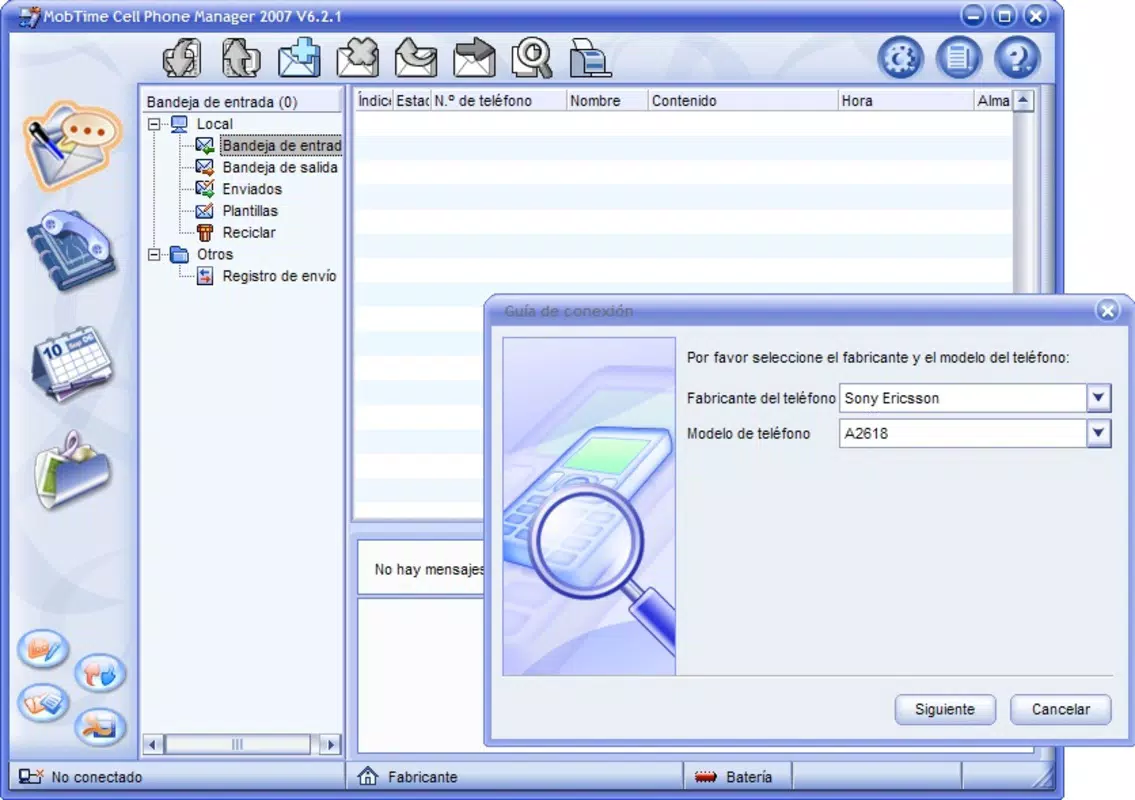
- Wide Compatibility: MobTime Cell Phone Manager is designed to work with a variety of mobile phone brands, including Nokia, Motorola, SonyEricsson, and Sharp. This broad compatibility enhances its utility across different device ecosystems.
- Multiple Connection Options: Users can connect their phones using USB, RS232 cable, infrared, or Bluetooth. This flexibility allows for integration with older and newer devices, accommodating varying hardware capabilities and user preferences.
- User-Friendly Interface: The app features an intuitive layout that simplifies navigation and data management. Even users with limited technical experience can perform backups and transfers with minimal effort.
- Secure Data Transfer: The application emphasizes reliable and protected data transmission, reducing the risk of corruption or loss during migration processes.
For example, a user upgrading from a legacy Nokia device to a modern Android phone can use the app to back up contacts via USB and then restore them on the new device. Similarly, someone switching carriers may use the tool to preserve message history and calendar entries before switching SIM cards. These practical applications highlight the app’s role in preserving digital continuity across device changes.
Interface, UX & Performance
The user interface of MobTime Cell Phone Manager is designed with simplicity and accessibility in mind. Its layout appears to prioritize clarity, with labeled sections and straightforward navigation paths. The visual style is minimalistic, focusing on functionality over decorative elements, which supports efficient interaction. Users can easily locate backup options, connection settings, and transfer progress indicators.
Navigation is reportedly intuitive, allowing users to move between backup, restore, and settings functions without confusion. The app’s performance is expected to be stable on devices meeting basic system requirements, though specific performance metrics were not disclosed. Although the developer did not list formal performance metrics, the app’s long-standing availability suggests consistent reliability across various device categories. Responsiveness appears to be adequate for standard backup tasks, with minimal lag during data transfer processes.
Stability is a key factor in data management tools, and MobTime Cell Phone Manager appears to maintain a consistent operational state during typical use. Users can expect the app to remain functional throughout backup sessions without unexpected crashes or freezes. The lightweight nature of the app—only 2.5 MB in size—contributes to its low system resource consumption, making it suitable for older or entry-level devices.
Platform Compatibility & Technical Requirements
MobTime Cell Phone Manager is available for the Android platform. The current software version is 1.2.0, and the app’s file size is 2.5 MB. While the developer did not specify minimum OS requirements, the app’s release date of 2008 suggests it was originally designed for early Android versions. This raises questions about its compatibility with modern Android systems, particularly those running on recent versions of the operating system.
Given the app’s age and lack of updated technical specifications, users are advised to verify compatibility with their specific device and OS version before installation. The absence of detailed compatibility information means that some newer Android devices may not support the app due to changes in system architecture, security protocols, or API availability. Users should also consider whether the app’s connection methods—such as RS232 and infrared—remain viable on current hardware, as these ports are increasingly rare in modern smartphones.
Pros and Cons
Pros
- Free to download and use, making it accessible for budget-conscious users.
- Supports multiple mobile brands, increasing its versatility across device types.
- Offers diverse connection methods, including USB, Bluetooth, and infrared.
- Designed with a user-friendly interface, suitable for non-technical users.
- Focuses on secure and reliable data transfer, minimizing risk of data loss.
Cons
- App version is outdated (1.2.0), raising concerns about compatibility with modern Android systems.
- Developer did not provide minimum OS or hardware requirements.
- Connection methods like RS232 and infrared may not be supported on newer devices.
- No information on regular updates or ongoing development.
- File size is minimal, but the app’s age may limit its effectiveness on current hardware and software.
FAQ
Is MobTime Cell Phone Manager safe to install?
The app is free and available for Android. While the developer did not provide detailed security certifications, its long-standing presence suggests it has been used by users without widespread reports of malicious behavior. As with any app, users should ensure they download it from trusted sources.
Can I use MobTime Cell Phone Manager on my current Android phone?
Compatibility with modern Android devices is uncertain. The app was released in 2008 and lacks updated technical requirements. Users are advised to check their device’s OS version and hardware capabilities before installation.
Does the app support the latest Android versions?
The developer did not disclose whether the app supports recent Android versions. Given its age and lack of updates, it may not function properly on newer systems.
What types of data can I back up?
MobTime Cell Phone Manager allows users to back up contacts, text messages, calendar events, images, and videos. These are standard data types essential for personal and professional use.
Are there any alternative tools for mobile data backup?
Yes, several modern alternatives exist, including built-in Android backup features, cloud-based services like Google Drive, and third-party apps with updated compatibility. Users seeking current support may prefer newer tools.
Final Thoughts
MobTime Cell Phone Manager remains a notable example of early mobile data management tools, offering a focused solution for backing up and transferring essential information. Its support for multiple brands and connection methods highlights its adaptability, while its user-friendly design ensures accessibility. However, its age and lack of recent updates present significant limitations for users on modern Android devices. While it may still function on older or low-end systems, compatibility with current hardware and software is not guaranteed.
For individuals managing legacy devices or seeking a lightweight, no-cost solution for basic data migration, the app may still hold value. However, users requiring long-term reliability and support should consider more up-to-date alternatives. The app’s core functionality—secure, local data backup—remains relevant, but its execution is constrained by time.
Download MobTime Cell Phone Manager now


